Blog
Native PHP in 2026 — building a tiny backend skeleton with AI (and knowing when to stop)
PHP backend developer Philippines — draft a thin router with AI, catch foot-guns in review, and know when Laravel is the right call instead.
As a PHP backend developer in the Philippines, I've shipped native PHP and MySQL behind Framework7/Cordova apps for years — mobile APIs, admin tools, order and trip state on live platforms. AI can draft a router in one session; it can also slip string-built SQL into the same diff if you're not watching. This post is about the first outcome — and how I review for the second.
This is the mirror image of my React Native post. There, I was learning a new stack with AI beside me. Here, I'm doing the opposite: deepening a stack I've shipped in production for years — native PHP, MySQL, mobile backends on live platforms — and using AI to move faster without forgetting what actually breaks in the wild. For the service side, see full stack PHP.
Who this is for: business owners evaluating a PHP backend proposal, HR screening technical scope, and developers on plain PHP who want AI speed with human review before release.
I'm not anti-framework. Laravel and Symfony exist for good reasons. But a lot of production PHP — especially in agencies, legacy platforms, and solo full-stack delivery — still runs as plain PHP with structure you built yourself. If that's your world, or you want to understand what frameworks are doing under the hood, this post is for you.
Thesis: AI is excellent at drafting a thin backend layer. You still own routing decisions, database boundaries, and security review before anything touches a client app.
A real pattern (Friday pressure)
On production mobile I've watched a single field rename in a JSON response break a merchant app that was already in the field — not because PHP failed, but because the contract changed without a version bump. The API was native PHP behind Framework7; the fix was small, the blast radius wasn't. Now every AI-generated endpoint gets a contract check: what mobile role calls this, what shape do they expect, what happens on 401. AI didn't cause that incident; unreviewed assumptions did. The workflow change was human, not magical.
What "no framework" actually means
"No framework" does not mean:
- One giant
index.phpwith 4,000 lines - Copy-pasting SQL everywhere with zero structure
- Ignoring CSRF, prepared statements, or session hygiene because "it's internal"
It does mean:
- A front controller — every request enters one file
- A router — URL → handler, explicit and readable
- A thin data layer — PDO with prepared statements, not a homemade ORM fantasy
- Controllers (or handlers) that stay small — business logic doesn't live in the router
- Config pulled from environment — never committed secrets
I've shipped food delivery, ride hailing, logistics, and e-commerce backends this way — Framework7/Cordova on the front, native PHP + MySQL behind it. See my work and about page for the broader picture. The mobile apps don't care whether you used Laravel or a 200-line router. They care that the API is consistent, secure, and doesn't fall over at 6 PM on a Friday.
Building a mini skeleton — not a full framework — teaches you where the complexity actually lives.
What I actually build (and what I stop at)
I cap scope on purpose. A useful skeleton has five to seven pieces, not fifty.
| Piece | Job | Stop when |
|---|---|---|
| Front controller | Bootstrap app, load config, dispatch | One entry file, no business logic |
| Router | Match method + path → handler | Regex or simple segments — no DSL |
| Controller / handler | HTTP in, HTTP out | No SQL here — call a service or repository |
| Database (PDO) | Connections, prepared statements | No query builder, no migrations framework |
| Middleware (optional) | Auth check, JSON content-type, CORS | Two or three middlewares max at first |
| Error handling | Consistent JSON errors in API mode | Log server-side; don't leak stack traces |
| Env config | .env or server vars | Never define('DB_PASS', '...') in git |
That's the whole list. If AI suggests a plugin system, event bus, and dependency injection container on day one — reject the diff.
Minimal shape (illustrative)
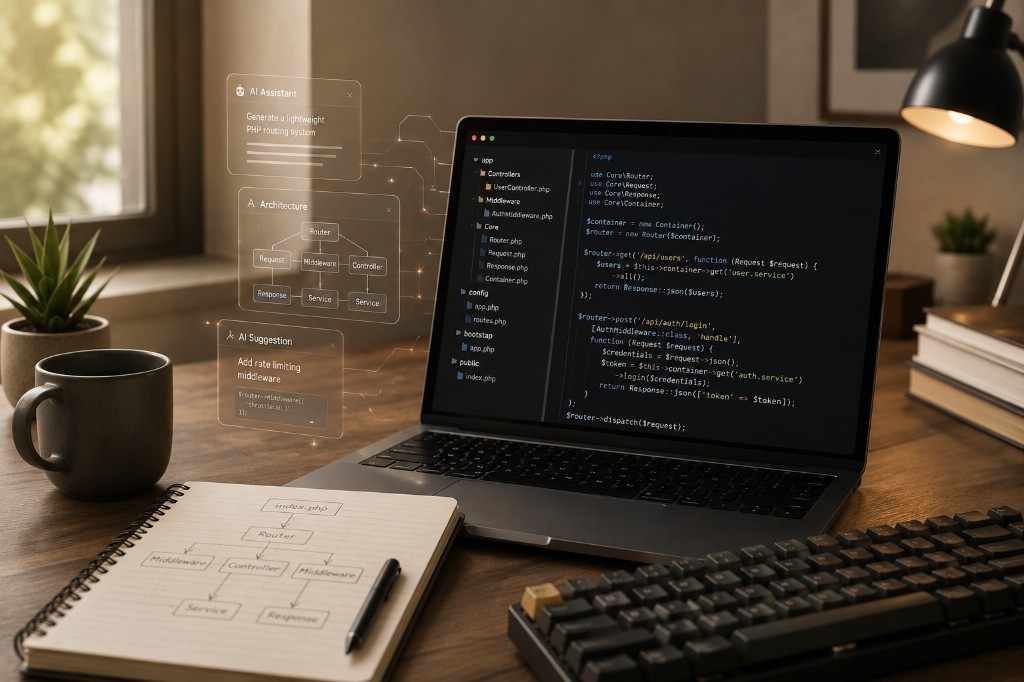
This isn't a repo I'm shipping from this post — it's the shape I ask AI to draft, then I read every line:
// public/index.php — front controller
require __DIR__ . '/../bootstrap.php';

$router = require __DIR__ . '/../routes/api.php';
$router->dispatch($_SERVER['REQUEST_METHOD'], parse_url($_SERVER['REQUEST_URI'], PHP_URL_PATH));
// src/Router.php — intentionally boring
final class Router
{
    private array $routes = [];

    public function get(string $path, callable $handler): void
    {
        $this->routes['GET'][$path] = $handler;
    }

    public function post(string $path, callable $handler): void
    {
        $this->routes['POST'][$path] = $handler;
    }

    public function dispatch(string $method, string $path): void
    {
        $handler = $this->routes[$method][$path] ?? null;
        if ($handler === null) {
            json_response(['error' => 'Not found'], 404);
            return;
        }
        $handler();
    }
}
// src/Database.php — PDO, nothing clever
final class Database
{
    public static function pdo(): PDO
    {
        static $pdo = null;
        if ($pdo === null) {
            $pdo = new PDO(
                sprintf('mysql:host=%s;dbname=%s;charset=utf8mb4', getenv('DB_HOST'), getenv('DB_NAME')),
                getenv('DB_USER'),
                getenv('DB_PASS'),
                [PDO::ATTR_ERRMODE => PDO::ERRMODE_EXCEPTION]
            );
        }
        return $pdo;
    }
}
Boring is the goal. You can trace a request from URL to SQL in five minutes. That's the superpower.
Step 1 — Read the backend like you read a mobile app
Same rule as React Native: map the territory before you prompt.
- Find the entry point —
public/index.php,.htaccess, or nginx config. - Trace one happy-path request — e.g.
POST /api/ordersfrom login to JSON response. - Find where auth lives — session, JWT, API key — and what happens when it fails.
- Open one table — naming, indexes, soft deletes, timestamps.
- Run it locally — break auth on purpose; confirm you get 401, not a white screen.
If you can't answer "what file handles this URL?", you shouldn't ask AI to add a new endpoint yet.
Step 2 — Rules for PHP + AI (the guardrails)
In Cursor or Claude projects, I keep PHP rules short and enforceable:
- PHP 8.2+, strict_types where new files are created.
- PDO only — prepared statements for all user input.
- No new Composer packages without explicit approval.
- Controllers return JSON for API routes; no HTML mixed in API handlers.
- Secrets in .env only — never commit credentials.
- Match existing folder layout; minimal diff per task.
- AI output is draft until manual security review.
These rules matter more on PHP than on greenfield React. PHP codebases accumulate include paths, global state, and "it worked on my XAMPP" assumptions. Rules keep AI from inventing a second routing system beside the one you already have.
Step 3 — Skills and checklists for backend work
I use situational skills the same way as for UI — saved senior-dev reminders:
"New API endpoint" skill:
- Route method + path
- Input validation (shape, types, required fields)
- Auth middleware — who can call this?
- Service/repository method — one job
- Response shape documented (even a comment block)
- Error cases: 400, 401, 404, 409, 500 — pick the real ones
- Manual test with curl or Postman before mobile integrates
"Security pass" skill:
- SQL: only prepared statements?
- Passwords:
password_hash/password_verify— never MD5, never AI's "simple hash" - Sessions:
httponly,secure,samesitewhere applicable - File uploads: type, size, storage path — if applicable
- Rate limiting: at least consider it on login
Skills don't replace thinking. They stop you from skipping step 6 because AI "finished" the feature.
Step 4 — How I prompt for backend first drafts
Weak prompt:
Build me a PHP backend for a food delivery app
Useful prompt:
Add
POST /api/v1/ordersto the existing Router inroutes/api.php. Follow the pattern inOrderController::show. Validatemerchant_id,items[]withproduct_idandqty. UseOrderRepository::create— add the method there with a transaction. Return 201 + order id JSON. PDO prepared statements only. No new Composer packages.
Notice: real files, one endpoint, explicit validation, transaction boundary named.
When extending an existing native PHP codebase:
- "Explain this request lifecycle before changing anything."
- "Add X following the pattern in file Y."
- "Diff only — no refactor of unrelated controllers."
That last line still saves hours — especially when AI wants to "modernize" your entire bootstrap.
Step 5 — Build in layers (same cake as mobile)
| Layer | What you verify |
|---|---|
| Front controller + router | 404 works, wrong method returns 405 |
| Health check | GET /health → 200 JSON |
| One read endpoint | List or show — correct JSON shape |
| One write endpoint | Validation errors return 400 with messages |
| Auth | Protected routes reject missing/invalid tokens |
| Mobile integration | Real device hits staging — CORS, HTTPS, timeouts |
I don't theme the admin dashboard before the backend connection plan is stable. Same discipline: contract first, polish later.
For mobile app backends, the mobile team needs a stable JSON shape more than they need PSR-7 compliance on day one. For custom web products — booking, portals, commerce — the priority is logic, auth, and integrations that survive real traffic.
Step 6 — What AI gets wrong (real examples)
I'm not romantic about this. AI accelerates first drafts and repeats patterns. It also confidently ships foot-guns. Things I've caught in review:
1. String-concatenated SQL "for simplicity"
AI will occasionally slip raw variables into queries despite your rules. Every query( and exec( gets human eyes.
2. Session fixation and weak cookie flags
Generated login flows sometimes set sessions without the flags your production server needs. Match your hosting environment — HTTPS on staging too if production is HTTPS.
3. Over-abstracted "framework" in one PR
You'll get a Kernel, Container, EventDispatcher, and three interfaces for a project that had twelve routes yesterday. Reject it. Add abstraction when you feel the pain twice, not when AI is bored.
4. N+1 queries in loops
foreach ($orders as $order) { fetch items } — AI loves this shape. Fix with joins or batch loads before mobile performance testing.
5. Generic error messages that leak internals
catch (Exception $e) { echo $e->getMessage(); } in API mode — log server-side, return a safe JSON body client-side.
If I can't explain a block to another developer, I don't deploy it — same rule as React Native.
Step 7 — When I reach for Laravel (or similar) instead
Honesty builds trust. I don't build a mini-framework for every project.
Reach for Laravel, Symfony, or a maintained API layer when:
- Team size grows — conventions beat personal taste
- Auth complexity — OAuth providers, password reset flows, email verification, policies
- Queues and jobs — background workers, retries, dead letters
- Testing infrastructure — PHPUnit + HTTP tests + factories already wired
- Long maintenance horizon — someone else will own this in two years
Stay with native PHP + thin structure when:
- Existing codebase is already native PHP and migrating is riskier than extending
- Scope is small — a handful of API endpoints behind a mobile app
- You need to move fast on a known server stack without Composer drama on shared hosting
- Learning goal — you want to understand routing, middleware, and request lifecycle deeply
There's no medal for avoiding frameworks. There's also no shame in knowing exactly what your 150 lines of router code do.
AI speed, my sign-off (production)
On production mobile I ship solo full-stack: mobile surfaces, admin tools, PHP APIs, MySQL schemas. AI makes the first drafts and repetition faster. It does not remove accountability for:
- SQL injection and auth boundaries
- Data integrity — transactions, foreign keys, idempotency on payments/orders
- backend connection plans — mobile apps in the field don't hot-swap when you rename a field
- Server config — PHP version, opcache, upload limits, TLS
- Regression — one new endpoint shouldn't break login
Fast drafts, careful release. Same rule as Framework7 apps going to the stores.
What I'd tell another developer
- Cap the skeleton — router, PDO, handlers, errors, env. Stop there.
- Write PHP rules before AI generates your second routing system.
- One endpoint per session — small diffs, easy review.
- Test with curl before mobile integrates — saves a week of "works on Postman."
- Read AI output like a security reviewer — especially SQL and auth.
- Know when to adopt a framework — mini-core is a learning and pragmatism tool, not a religion.
Where this fits in my stack
- Production mobile — native PHP + MySQL backends behind Framework7/Cordova apps; AI accelerates, I review before release.
- Learning (this portfolio) — Next.js/React with the same AI workflow; see the React Native post for the greenfield-stack side and AI web developer vs traditional for the web hiring comparison. Scope and delivery: AI engineering.
- Web products — web development for booking, portals, and custom builds; full stack PHP for APIs and admin behind mobile apps.
Building a tiny PHP skeleton with AI isn't about proving you're smarter than Laravel. It's about shipping with clarity when the project, the team, or the legacy codebase calls for it — and still owning every line that touches user data.
Belief I'll stand on: Boring, traceable PHP beats clever first drafts you can't explain under outage pressure.
FAQ
Should I use plain PHP or a framework for a mobile API backend in the Philippines?
Depends on team size, timeline, and what already runs in production. Plain PHP with a thin router you understand is fine for solo full-stack or legacy platforms — especially when mobile apps depend on stable JSON contracts. Laravel or Symfony earn their keep when you need auth packages, queues, and a larger team on day one. I ship both patterns; the wrong choice is picking one because AI suggested it without a scope conversation.
Is AI-assisted PHP development safe for production?
Only after human review. AI is excellent at first drafts handlers and CRUD; you still own SQL injection boundaries, auth, transactions, and backend connection plan stability for apps already in the field. See full stack PHP services for how I scope backend work behind mobile.
When should I use Laravel instead of plain PHP?
When you need queues, packages, a larger team, and long-term framework conventions from day one. Plain PHP with a thin router fits solo full-stack, legacy codebases, and mobile APIs where you own every line.
What is a mini PHP framework in this context?
A small router, thin controllers, secure database access, and clear folder boundaries — enough structure without importing all of Symfony or Laravel. AI drafts it fast; you still design routes and security.
How do you review AI-generated PHP before merge?
Check SQL for injection, secrets in repo, auth on every protected route, API JSON shape vs mobile contract, error handling, and transaction boundaries on money paths.
Can AI generate migrations and database schema?
Yes as drafts — I always verify indexes, foreign keys, nullable fields, and whether the schema matches the process flow states before any client app integrates.
What breaks mobile apps when PHP APIs change?
Silent field renames, new status values the app does not handle, and 401 behavior changes. Version the contract or update mobile in the same sprint as backend changes.
Do you use AI for PHP on greenfield or legacy only?
Both. Greenfield gets first drafts from flow docs; legacy gets careful diffs against existing patterns. Legacy needs more review, not less.
What should I send for a PHP API backend quote?
Role list, endpoint list or flow diagram, auth model, payment hooks, expected traffic, and whether mobile apps already exist in production.
How does this relate to full-stack JavaScript delivery?
React or mobile front ends consume the same JSON contract. PHP mini-core behind a React SPA is a common lane — see full-stack JavaScript blog for deploy context.
Questions? Get in touch — happy to talk shop about PHP backends, mobile backend connection plans, or how to structure AI rules for your repo.